By Prashant Singh, CTO of HomeoAxis
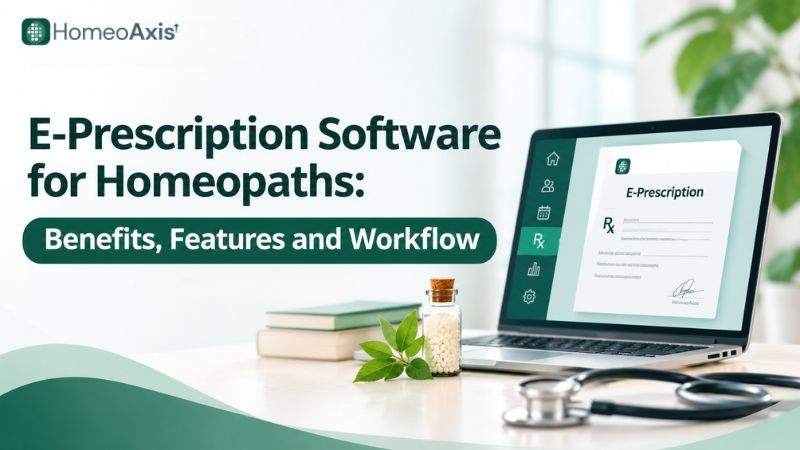
E-prescription software for homeopaths helps practitioners create, store, manage and share digital prescriptions. It records remedies, potencies such as 30C, 200C and 1M, dosage instructions such as OD, BD and TDS, medicine forms such as drops or pills, and follow-up dates. The practitioner reviews and approves every prescription.
What Is E-Prescription Software for Homeopaths?
E-prescription software for homeopaths is a digital tool that helps practitioners prepare, store and share prescriptions electronically instead of relying only on handwritten prescription slips.
It allows practitioners to record:
Patient details: Name and relevant identification information.
Remedy name: The prescribed homeopathic medicine.
Potency: Such as 30C, 200C, 1M, 10M and CM.
Medicine form: Such as drops or pills.
Dosage and frequency: Instructions such as OD, BD and TDS.
Duration: The prescribed period, where applicable.
Follow-up: Review dates and relevant instructions.
Practitioner details: Name and applicable registration information.
Some systems also connect prescriptions with patient profiles, consultation notes, case-taking records, repertory and materia medica tools, billing, pharmacy and inventory management.
This connection helps clinics manage prescription information alongside other patient and administrative records.
What Are the Benefits of E-Prescription Software?
E-prescription software makes prescription preparation more organised and reduces repetitive administrative work in homeopathy clinics.
The main benefits include:
1. Clear and Readable Prescriptions
Handwritten prescriptions may be difficult to read, particularly when clinics handle many consultations. Digital prescriptions use typed text, making remedy names, potencies and dosage instructions easier to read.
2. Faster Prescription Preparation
Practitioners can enter prescription details into predefined fields rather than writing the same patient and clinic information repeatedly. Saved patient details and reusable prescription formats also reduce repetitive data entry.
3. Organised Prescription History
Digital systems store previous prescriptions against patient records. Practitioners can retrieve earlier prescriptions during follow-up consultations instead of searching through physical files.
4. Homeopathy-Specific Prescription Fields
Homeopathy-focused software can provide fields for remedy names, potencies, drops, pills, dosage frequency and duration. Some systems also connect prescriptions with repertory, materia medica and case-taking workflows.
5. Easier Prescription Sharing
Digital prescription software can generate PDF documents or provide secure ways to share prescriptions with patients. This makes it easier for patients to access their prescription without collecting a physical copy from the clinic.
6. Better Connection With Clinic Records
When prescription software connects with patient management, consultation history, billing and follow-up records, clinics can manage more of their daily work through one system.
The benefits depend on the software's actual features and how consistently practitioners and staff use it.
How Does E-Prescription Software Compare With Paper, Word/Excel and Generic EMR?
Homeopathy clinics can prepare prescriptions using handwritten slips, office documents, generic electronic medical record systems or dedicated clinic management software.
Each option has different capabilities.
Prescription option | Advantages | Limitations |
Paper prescriptions | Simple and do not require software or internet access | Physical storage, manual searching and possible handwriting difficulties |
Word or Excel | Flexible formats and basic digital storage | Manual file organisation and limited patient-history management |
Generic EMR software | Patient records and general prescription management | May not provide homeopathy-specific remedy and potency fields |
Homeopathy clinic management software | Connects prescriptions with patient records, consultations, repertory and follow-ups | Features, pricing and prescription workflows vary by provider |
A clinic should choose software based on its actual requirements. A practitioner who needs only basic PDF generation may not require a complete clinic management platform. A clinic handling regular follow-ups, multiple practitioners and medicine dispensing may benefit from connected patient, prescription, billing and pharmacy records.
What Features Should Homeopathy E-Prescription Software Have?
Before selecting e-prescription software, homeopaths should check whether it supports their prescription format, patient records and clinic workflow.
Feature | Why it matters | What to check |
Patient details | Connects prescriptions with the correct patient | Patient name, contact details and identification |
Remedy selection | Records prescribed homeopathic remedies | Searchable remedy fields and clear medicine names |
Potency selection | Records the prescribed potency | 30C, 200C, 1M, 10M and CM |
Medicine form | Records the prescribed form | Drops, pills and other relevant forms |
Dosage and frequency | Communicates how the medicine should be taken | OD, BD, TDS, quantity and duration |
PDF generation | Creates a digital prescription document | Downloadable and readable PDF format |
Clinic letterhead and margins | Identifies the issuing clinic and aligns the prescription with stationery | Full clinic header or pre-printed letterhead format, with configurable margins |
Prescription history | Helps practitioners review earlier prescriptions | Searchable patient-wise records |
Follow-up management | Supports continuity between consultations | Follow-up dates and reminders |
Case-taking records | Connects prescriptions with consultation information | Access to relevant patient case history |
Repertory and materia medica | Supports homeopathy-specific clinical workflows | Availability of required repertory and reference tools |
Billing and pharmacy | Connects prescriptions with medicine preparation and payments | Invoice generation, pharmacy workflow and inventory |
User access controls | Helps protect patient information | Role-based access and staff permissions |
Patient sharing | Makes prescriptions easier to access | Patient portal, secure links or other supported sharing options |
Clinics should also check whether the software supports data export, backup, access controls and the ability to correct or update records.
How Does an E-Prescription Workflow Work?
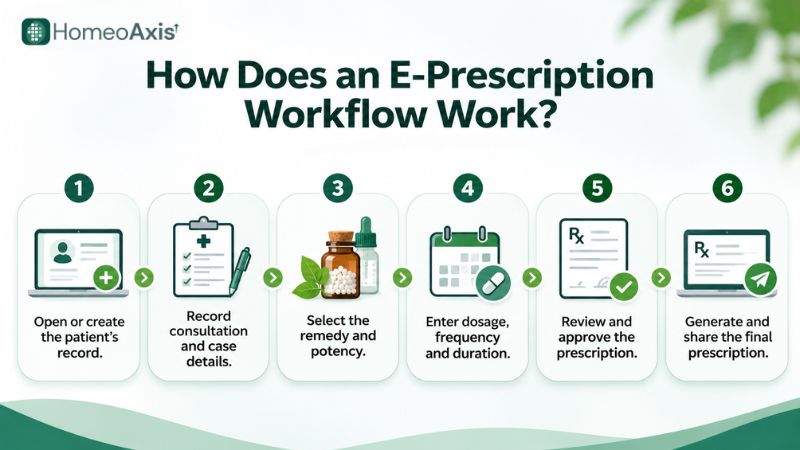
An e-prescription workflow generally involves six steps:
Open or create the patient's record.
Record consultation and case details.
Select the remedy and potency.
Enter dosage, frequency and duration.
Review and approve the prescription.
Generate and share the final prescription.
Step 1: Open the patient record. The practitioner or authorised staff member opens an existing profile or creates a new patient record. The clinic should verify the patient's identity before entering prescription information.
Step 2: Record consultation details. The practitioner documents relevant symptoms and case details. The amount of information recorded depends on the consultation and the clinic's documentation process.
Step 3: Select the remedy and potency. The practitioner selects the appropriate remedy and enters the prescribed potency, such as 30C, 200C, 1M, 10M or CM. These are examples of prescription formats, not recommendations for any particular patient.
Step 4: Enter dosage and instructions. The practitioner enters the medicine form, dosage, frequency and duration. The software may support drops or pills and frequency formats such as OD, BD and TDS.
Step 5: Review and approve the prescription. The practitioner checks patient details, remedy, potency, dosage, duration, follow-up information and clinic details before issuing the document.
Step 6: Generate and share the prescription. The clinic generates the digital prescription, downloads or prints it, or shares it through a supported digital channel. The document can then be stored against the patient's record.
What Should a Homeopathic Prescription Include?
A homeopathic prescription should contain clear information about the patient, practitioner, prescribed medicine and instructions.
A practical checklist includes:
Patient details: Name and other relevant identification information.
Prescription date: The date on which the prescription is issued.
Practitioner details: Name and applicable professional registration details.
Remedy name: The prescribed homeopathic medicine.
Potency: The potency selected by the practitioner.
Medicine form: Drops, pills or another prescribed form.
Dosage: The quantity or instructions for taking the medicine.
Frequency: How often the medicine should be taken.
Duration: The prescribed period, where applicable.
Additional instructions: Relevant directions for the patient.
Follow-up: The recommended review date or instructions.
Authentication: The applicable practitioner authentication or signature.
Regulation 7 of the NCH Professional Conduct Regulations, 2022 requires the practitioner's registration number to appear on every prescription and to be displayed in the clinic. Clinics should review the full regulations to understand the requirements applicable to their practice.
What Should Indian Clinics Check Before Using E-Prescription Software?
Indian homeopathy clinics should consider professional regulations, electronic records, patient-data protection and telemedicine requirements when adopting digital prescription systems.
The following legal references were checked on 16 November 2026. Clinics should consult the latest official notifications before making compliance decisions.
1. National Commission for Homoeopathy Regulations
The National Commission for Homoeopathy (NCH) issued the National Commission for Homoeopathy (Professional Conduct, Etiquette and Code of Ethics for Practitioners of Homoeopathy) Regulations, 2022.
The following provisions are relevant to prescription and record management:
Regulation 7 – Prescription and Medical Certificate: Practitioners must provide a prescription within 72 hours when it is requested or required. They must also issue a medical certificate when desired and retain a copy for at least three years. The practitioner's registration number must appear on every prescription and be displayed in the clinic.
Regulation 28 – Consultation by Telemedicine: Registered homeopathy practitioners may consult through telemedicine in accordance with applicable Central or State Government guidelines.
Regulation 36 – Professional Misconduct: The regulation identifies failure to display the registration number in the clinic and failure to maintain prescription and certificate records as professional misconduct for which the practitioner is liable for disciplinary action.
Regulation 38 – Guidelines on Proper Prescription and Dispensing: Practitioners should keep their knowledge of homeopathic medicines current, prescribe an appropriate dose and duration for the clinical condition, make prescribing decisions after proper clinical assessment and diagnosis, and maintain patient records in line with the CCRH Good Clinical Practice guidelines.
Clinics should read the complete regulations rather than relying only on a software provider's description.
Official source: NCH Professional Conduct Regulations, 2022
2. Information Technology Act, 2000
The Information Technology Act, 2000 recognises electronic records and electronic signatures, subject to the conditions set out in the Act.
Two relevant provisions are:
Section 4: Recognises electronic records where the information can be accessed and used for later reference.
Section 5: Recognises electronic signatures when the prescribed authentication requirements are met.
A scanned signature image or a signature inserted into a PDF should not automatically be treated as an electronic signature that satisfies every legal requirement. Clinics should check the applicable requirements for the type of document and authentication method they use.
Official source: Information Technology Act, 2000 – India Code
3. Digital Personal Data Protection Rules, 2025
Homeopathy clinics that collect and manage digital patient information should consider their obligations under India's Digital Personal Data Protection framework.
The Digital Personal Data Protection Rules, 2025 were notified on 13 November 2025. Their provisions have different commencement dates:
13 November 2025: Rules 1, 2 and 17–21 came into force on publication.
13 November 2026: Rule 4, which covers Consent Managers, came into force.
13 May 2027: Rules 3, 5–16, 22 and 23 are scheduled to come into force.
Separately, the commencement schedule for the Digital Personal Data Protection Act places sections 3–5, sections 6(1)–(8) and 6(10), sections 7–17 and other specified provisions on the 18-month timeline, which ends on 13 May 2027.
Clinics should prepare for the applicable requirements and confirm which provisions apply to their activities and role as Data Fiduciaries.
Official sources:
4. ABDM and Health Data Management
Clinics exploring digital health infrastructure should also review the Ayushman Bharat Digital Mission (ABDM) and its Health Data Management Policy.
The policy provides a framework for handling health information within the ABDM ecosystem. Clinics should not assume that ordinary e-prescription software automatically supports ABHA, ABDM integration or health-record exchange. These capabilities should be confirmed with the software provider.
Official reference: ABDM Health Data Management Policy – National Health Authority
What Are the Limitations of E-Prescription Software?
E-prescription software improves prescription documentation, but clinics should understand its limitations before adopting it.
1. It Does Not Replace Clinical Judgement
The software records prescription information and generates documents. It does not independently establish a diagnosis or determine the appropriate remedy, potency or dosage. The practitioner remains responsible for clinical decisions and prescription approval.
2. Incorrect Data Can Lead to Incorrect Prescriptions
If incorrect patient details, remedy names, potencies or dosage instructions are entered, the generated prescription may also contain errors. Practitioners should review the complete document before issuing it.
3. Some Features Require Internet Access
Cloud-based systems generally require an internet connection to access and update live patient records. Clinics should check whether the software provides offline access and which functions remain available without connectivity.
4. Patient Information Requires Protection
Digital prescriptions and patient records contain personal information. Clinics should review access permissions, security controls, backup arrangements and data-handling practices.
5. Medicine-Name Masking Can Change Patient-Facing Documents
When masking is enabled, patients may see coded identifiers instead of remedy names. Clinics should understand how this changes the patient-facing document and ensure that the prescription meets applicable requirements.
How Do Clinics Implement E-Prescription Software?
A clinic can introduce e-prescription software gradually instead of changing every administrative process at once.
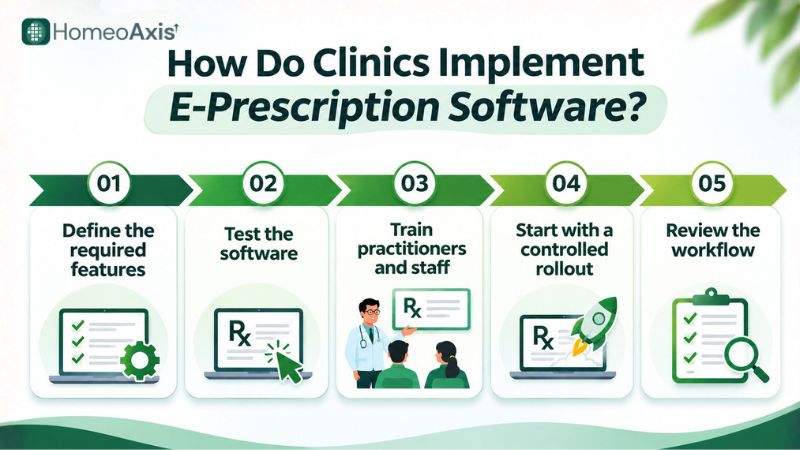
Review the existing process: Identify how prescriptions are prepared, stored and shared, and where staff spend time on repetitive work.
Define the required features: List the clinic's needs, including patient profiles, remedy and potency fields, dosage options, PDF generation, letterhead settings, repertory, follow-ups and patient sharing.
Test the software: Use sample patient records and prescription formats to check whether the system supports the clinic's actual workflow.
Train practitioners and staff: Explain how to create patient records, enter prescription information, generate documents and manage access permissions.
Start with a controlled rollout: Begin with a small group of consultations or practitioners to identify workflow issues before wider adoption.
Review the workflow: Check prescription accuracy, record retrieval, staff adoption and patient access after implementation.
For example, a clinic handling 40 consultations a day can review how much time is spent preparing prescriptions and searching for previous records. Actual time savings depend on the clinic's workflow and software use.
How Much Does E-Prescription Software Cost?
The cost of e-prescription software in India depends on the provider, subscription plan, number of users, patient limits, available modules and billing period. Some products offer limited free access, while others include e-prescriptions within a wider clinic-management subscription.
Homeopathy Software Pricing Comparison
Publicly listed prices on selected homeopathy software websites checked on 16 November 2026 include:
Software | Plan | Published price |
Homoeoclinics | Solo | ₹999/month |
HomeoSuite | Essential | ₹999/month |
HomeoSuite | Clinical | ₹1,499/month |
Homeofarm AI | Starter | ₹999/month + GST |
These prices represent selected entry-level plans, not a market-wide average. They are not directly equivalent because providers offer different features, usage limits and billing terms. Homeofarm explicitly lists its price as plus GST, while the displayed Homoeoclinics and HomeoSuite prices do not clearly state whether GST is included.
Sources: Homoeoclinics pricing, HomeoSuite plans and Homeofarm AI pricing.
HomeoAxis Pricing
According to the HomeoAxis pricing page checked on 16 November 2026, the platform offers a permanent Free plan and three paid plans: Solo, Growth and Chain.
HomeoAxis plan | Monthly price | Clinics | Doctors | Staff users | Patient limit |
Free | ₹0 | 1 | 1 | 2 | 100 patients/month |
Solo | ₹1,999 | 1 | 2 | 5 | Unlimited |
Growth | ₹3,499 | Up to 3 | Up to 6 | Up to 15 | Unlimited |
Chain | ₹5,999 | Up to 5 | Up to 12 | Up to 30 | Unlimited |
Digital e-prescriptions are included across all four plans. The pricing page also lists core features such as appointments, patient records, consultations, billing, role-based access control and WhatsApp notifications.
The Free plan provides basic clinic-management access for one clinic and one doctor, with two staff users and a limit of 100 patients per month. The paid plans provide higher usage limits and additional capacity for clinics, doctors and staff. Their listed features also include additional clinic-management capabilities such as repertory, pharmacy, inventory and medicine dispatch.
HomeoAxis's paid plans start at ₹1,999 per month. This is higher than the selected ₹999–₹1,499 competitor plans listed above. The comparison should therefore consider the included modules, number of users, clinic limits and patient capacity rather than monthly price alone.
Free Plan and 7-Day Trial: What Is the Difference?
HomeoAxis offers two separate ways to get started:
Free plan: An ongoing ₹0 plan with one clinic, one doctor, two staff users and a limit of 100 patients per month. Digital e-prescriptions are included.
7-day free trial: A separate trial advertised as providing full access, with no credit card required and cancellation available anytime.
The pricing page does not specify the exact paid tier or advanced feature access included in the trial. Clinics should confirm the features they want to test before starting.
Monthly and Annual Billing
The HomeoAxis pricing page displays a Monthly / Annual-10% billing option. The annual option is labelled with a 10% discount, but the opened pricing view does not provide separate annual totals for each plan.
The page also does not clearly state whether the displayed monthly prices include GST. Check the selected billing cycle, final payable amount and applicable taxes at checkout before subscribing.
Pricing last checked: 16 November 2026.
Source: HomeoAxis Pricing
How Does HomeoAxis Support E-Prescriptions?
HomeoAxis is a homeopathy clinic management platform that includes e-prescription functionality alongside patient records, consultation management and other clinic operations.
Its prescription-related features fit into six areas.
1. Prescription Formats and Homeopathy-Specific Fields
HomeoAxis supports remedy names, potencies including 30C, 200C, 1M, 10M and CM, and dosage instructions for drops or pills. Practitioners can also enter frequency formats such as OD, BD and TDS and specify the duration of the prescription.
The platform provides two PDF prescription formats:
Auto Mode: Generates a full clinic header with the clinic logo, doctor details, registration number, patient information, diagnosis, medicines, follow-up details and doctor signature.
Letterhead Mode: Generates a minimal header designed for printing on pre-printed clinic letterhead. Clinics can configure header and footer margins in millimetres to align the prescription with their stationery.
HomeoAxis also supports uploading a signature image that can be embedded in the generated PDF. A signature image should not automatically be treated as an electronic signature that meets every legal requirement.
2. Repertory, Materia Medica and Formula Search
HomeoAxis includes repertory and materia medica tools within its consultation workflow. It uses the open OOREP "publicum" repertory with classic Kent-style grades.
Practitioners can search rubrics, build a case and view a graded remedy grid. The system also provides access to remedy materia medica and a formula search feature for finding and applying established remedy combinations.
HomeoAxis also includes AI-assisted case analysis. These tools support the practitioner's workflow; they do not replace clinical assessment or prescription review.
More details: HomeoAxis Repertory and Materia Medica
3. Prescription Sharing and Patient Portal
HomeoAxis supports sharing a private prescription link through a post-visit WhatsApp message. Patients can use the link to access and download their prescription. The prescription is shared through a link rather than as a direct PDF attachment through WhatsApp.
The platform also provides a patient portal through a Progressive Web App (PWA). Patients can access prescriptions and other supported information through the portal.
More details: HomeoAxis Patient Portal
4. Medicine-Name Masking
HomeoAxis includes a medicine-name masking option for patient-facing prescriptions and invoices.
When masking is enabled, coded identifiers appear instead of actual remedy names on those documents. The actual remedy names remain in the underlying clinic records, where practitioners can review them. The feature changes the patient-facing output, not the underlying database.
Clinics should review the professional and legal implications of using this feature and ensure that their prescriptions meet applicable requirements.
5. Billing, Pharmacy, Inventory and Dispatch
HomeoAxis connects prescription workflows with billing, medicine preparation, pharmacy and inventory management.
Its wider platform includes:
Invoice generation and payment collection.
A medicine preparation queue.
Pharmacy POS and inventory management.
Batch and expiry tracking.
Shiprocket integration for courier dispatch.
Porter integration for local delivery.
This connects the prescription with subsequent medicine preparation, billing and dispatch processes.
More details: HomeoAxis Billing, Inventory and Pharmacy Features
6. Security, Offline Access and Current Limitations
HomeoAxis lists role-based access controls for managing staff permissions. It also provides an encrypted, read-only offline copy of clinic records. Users can read available offline information, but creating new records or making changes requires an internet connection so updates can sync.
HomeoAxis can be accessed through mobile browsers and installed as a PWA. A native mobile application is listed as coming soon.
Clinics should also be aware that:
HomeoAxis does not currently provide ABDM or ABHA integration.
HomeoAxis does not currently support Hindi or regional-language prescription generation.
For complete product details, visit:
Frequently Asked Questions
1. What does e-prescription software do for a homeopathy clinic?
It creates electronic prescriptions, stores them with patient records and makes previous prescription details easier to retrieve during follow-up consultations.
2. How much does e-prescription software cost?
Publicly listed paid homeopathy software plans checked on 16 November 2026 include selected entry-level prices from ₹999 to ₹1,499 per month. The displayed prices do not all specify whether GST is included, and the plans do not offer identical features.
HomeoAxis has a Free plan at ₹0 per month, with e-prescriptions, one clinic, one doctor, two staff users and a limit of 100 patients per month. Its paid plans are Solo at ₹1,999 per month, Growth at ₹3,499 per month and Chain at ₹5,999 per month.
3. Can e-prescription software generate prescriptions on pre-printed clinic letterheads?
Yes. Some e-prescription systems support a letterhead format that prints prescription details on pre-printed clinic stationery.
HomeoAxis provides a Letterhead Mode with configurable header and footer margins in millimetres. It also provides an Auto Mode with the full clinic header.
4. Is patient information safe in e-prescription software?
Patient-data protection depends on the software's access controls, security practices, backup arrangements and data-handling processes. Clinics should check these details with the provider rather than assume that every system offers the same protection.
HomeoAxis lists role-based access controls and provides an encrypted, read-only offline copy of clinic records. Clinics should confirm its backup, hosting and other data-protection arrangements before adopting the platform.
5. Can homeopaths share digital prescriptions through WhatsApp?
Yes. Some systems support prescription sharing through WhatsApp links or other digital channels.
HomeoAxis supports sharing a private prescription link through a post-visit WhatsApp message. Patients can use the link to access and download their prescription; it is not sent as a direct PDF attachment.
6. Can existing patient records be imported into e-prescription software?
Yes, if the software supports importing the clinic's existing data format.
HomeoAxis supports CSV patient imports of up to 5,000 records, with a preview and duplicate checks. Existing case numbers can be retained, but historical case histories are not converted into structured case records through the import process. Clinics should keep their original files and verify imported records before going live.
7. Can e-prescription software generate prescriptions in Hindi or regional languages?
HomeoAxis does not currently support Hindi or regional-language prescription generation. Language support varies by provider, so clinics that require prescriptions in these languages should confirm the available options before subscribing.
8. Does e-prescription software support homeopathic repertory and materia medica?
Some homeopathy-focused systems include repertory and materia medica tools alongside patient and prescription management.
HomeoAxis includes the open OOREP "publicum" repertory with Kent-style grades and access to materia medica within the consultation workflow.
9. Can e-prescription software be used on mobile phones?
Yes. Many cloud-based systems support mobile browsers or progressive web apps.
HomeoAxis supports mobile browser and PWA access. Its native mobile application is listed as coming soon.
10. Does e-prescription software work without an internet connection?
HomeoAxis provides read-only offline access to an encrypted copy of clinic records. Users can read available offline information, but creating new records or making changes requires an internet connection so updates can sync with the live system.
Offline capabilities vary by provider, so clinics should check exactly which records and functions remain available during an internet outage.
11. What should a homeopathic prescription include?
A homeopathic prescription should include relevant patient and practitioner details, the prescription date, remedy name, potency, medicine form, dosage, frequency, duration and necessary instructions.
Regulation 7 of the NCH Professional Conduct Regulations, 2022 also requires the practitioner's registration number to appear on every prescription and be displayed in the clinic.
12. Is there free e-prescription software for homeopaths?
Yes. Some providers offer limited free plans or demo access, although patient limits and available features vary.
HomeoAxis lists a Free plan at ₹0 per month. It includes e-prescriptions for one clinic and one doctor, with two staff users and up to 100 patients per month. HomeoSuite also lists a free demo plan with limited lifetime access for up to 10 patients. These plans have different limits and features, so clinics should check whether they meet their requirements.
HomeoAxis also advertises a separate 7-day full-access trial with no credit card required.
Free-plan information last checked: 16 November 2026.
13. Can homeopaths issue e-prescriptions during online consultations?
Yes, where the consultation follows applicable telemedicine guidelines.
Regulation 28 of the NCH Professional Conduct Regulations, 2022 permits telemedicine consultations by registered homeopathy practitioners in accordance with the relevant Central or State Government guidelines. Practitioners should review the applicable requirements before issuing prescriptions through online consultations.
14. Can e-prescription software hide medicine names on patient-facing prescriptions?
Yes. Some software, including HomeoAxis, can display coded identifiers instead of actual remedy names on patient-facing prescriptions and invoices.
In HomeoAxis, the underlying clinic records retain the actual remedy names for practitioner use. Clinics should review the professional and legal implications before enabling this feature.
Final Takeaway
E-prescription software for homeopaths helps practitioners prepare readable digital prescriptions, organise patient records and manage prescription history.
When selecting a system, practitioners should evaluate homeopathy-specific fields, potency and dosage options, letterhead settings, repertory and materia medica support, patient-record management, follow-up features, security controls and data export.
For clinics looking for prescription management alongside patient records, billing, pharmacy and other clinic operations, HomeoAxis provides e-prescription functionality within its wider homeopathy clinic management platform. Clinics should review its current features, plan inclusions, pricing and limitations before choosing a subscription.
About the Author
Prashant Singh is the CTO of HomeoAxis. He writes about software, technology and digital workflows for homeopathy clinics, with a focus on practical tools that support clinic administration and patient-record management.