
By Prashant Singh, CTO, HomeoAxis
Homeopathy clinic automation uses software to handle repeatable clinic work. Start with booking, reminders, patient registration, billing and follow-up scheduling, then add prescriptions, stock and reporting as needed. Doctors keep control of every clinical decision.
What Is Homeopathy Clinic Automation?
Homeopathy clinic automation means using software to complete routine administrative work, such as scheduling appointments, recording payments, maintaining patient files and tracking follow-ups. It reduces repeated manual tasks while leaving consultation and treatment decisions with the doctor.
For example, when a patient books an appointment for Thursday and receives the booking details automatically, the clinic has automated a scheduling task. Staff no longer need to write the booking in one register and send the details separately.

The 10 Tasks at a Glance
Start with the first five tasks because they address common administrative work. Add the remaining tasks according to your clinic's consultation, prescription and dispensary requirements.
Priority | Clinic task | What automation handles |
Start here | Appointment booking | Available slots, bookings and confirmations |
Start here | Appointment reminders | Scheduled messages before visits |
Start here | Patient registration | Digital patient profiles and searchable records |
Start here | Billing and payments | Invoices and payment records |
Start here | Follow-up scheduling | Next-visit dates and pending follow-ups |
Next | Case-history templates | Structured consultation notes |
Next | Prescription generation | Formatting and storing doctor-approved prescriptions |
Next | Dispensary stock | Stock entries, deductions and low-stock alerts |
If needed | Medicine orders and delivery | Order and dispatch records |
Next | Daily reports | Clinic activity and financial summaries |
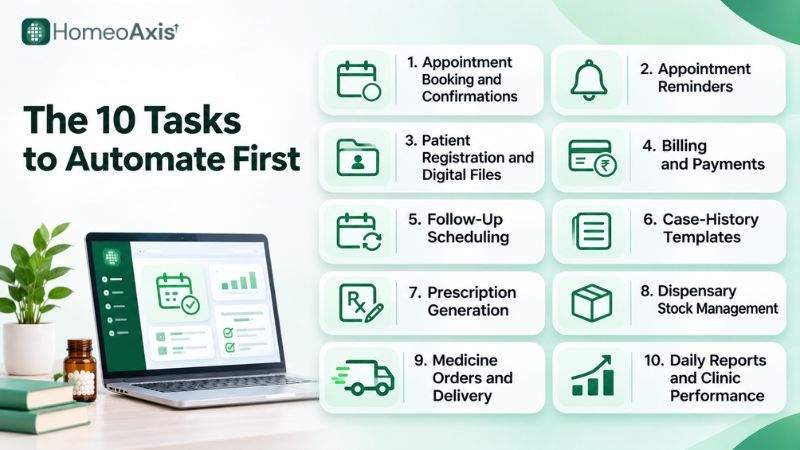
The 10 Tasks Explained
1. Appointment Booking and Confirmations
Appointment automation lets patients book available slots and helps staff maintain an organised schedule.
Automate:
Online appointment booking.
Booking confirmations with the date, time and doctor's name.
Rescheduling and cancellation updates.
Appointment records linked to patient profiles.
Staff's call: Reception staff should handle urgent requests, unusual scheduling requirements and patients who prefer booking by phone.
Example: A patient books a consultation at 10 PM for the following afternoon. The booking is recorded, and the patient receives the details without waiting for the clinic to open.
Measure it by: Double-bookings, time spent checking the appointment diary and booking-related calls.
2. Appointment Reminders
Appointment reminders help patients remember upcoming visits. Unlike booking confirmations, reminders are sent at a scheduled time before the appointment.
Automate:
Reminders at intervals selected by the clinic.
Basic appointment details, including date, time and doctor.
A contact route for patients who need to change their appointment.
Staff's call: Staff should personally contact patients who do not respond or need help changing their appointment.
Keep reminders limited to appointment information. Do not include diagnoses, symptoms, remedy details or other sensitive consultation information.
Example: A patient has a follow-up appointment on Friday. The system sends a scheduled reminder, so staff do not have to check the diary and message the patient separately.
Measure it by: Weekly no-show rate and the number of missed appointments.
For a full guide to reducing missed appointments, read How to Reduce Patient No-Shows in a Homeopathy Clinic.
3. Patient Registration and Digital Files
Digital patient files keep contact details and consultation records in one place. They make it easier for authorised staff to find patient information without searching through multiple registers.
Automate:
Patient registration and contact details.
Patient profiles and visit records.
Storage of reports and scanned documents.
Family links where multiple family members visit the clinic.
Staff's call: Reception staff can enter basic registration details. Access to clinical notes should be restricted to authorised clinical users.
Example: A patient who first visited in 2019 returns after two years and remembers only the old register number. Because the number was kept as a search key during migration, reception finds the digital file in seconds instead of searching through name variations.
Measure it by: Time required to retrieve a patient file and the number of duplicate or incomplete records.
4. Billing and Payments
Billing automation helps clinics prepare invoices, record payments and review collections without calculating every amount manually.
Automate:
Consultation, medicine and delivery charges.
Invoice generation and PDF records.
Online payment collection through supported integrations.
Payment status and outstanding balances.
Daily collection summaries.
Advance payments recorded against the relevant invoice.
Staff's call: Staff should review discounts, advances, waivers and refunds before finalising a transaction. Ask your accountant how consultation fees and medicine sales should appear on invoices, including the applicable tax treatment.
Example: A patient pays ₹500 in advance and settles the remaining ₹700 after the consultation. Both payments should be recorded against the same invoice so the balance is clear.
HomeoAxis supports automatic invoicing and online payments through Razorpay.
Measure it by: Minutes needed to prepare a bill, billing corrections and differences between recorded payments and day-end collections.
5. Follow-Up Scheduling
Follow-up scheduling helps clinics keep track of patients who need another appointment or a planned check-in.
Automate:
Recording the next follow-up date.
Scheduling reminders.
Maintaining a list of overdue follow-ups.
Recording patient feedback and reported outcomes.
Doctor's call: The doctor reviews the patient's response and decides the next clinical step. A reminder system should not make that decision.
Example: A patient on a chronic course is due for review on the 15th. On the 12th, the system sends a reminder. If the patient does not book, they appear on the overdue list for staff to call.
HomeoAxis includes feedback and outcome tracking to help clinics organise follow-up information.
Measure it by: Number of overdue follow-ups and the proportion of planned follow-up appointments completed.
For chronic cases, a patient portal can support follow-up compliance. Read Patient Portal for Chronic Care Follow-Up Compliance.
6. Case-History Templates
Structured case-history forms help doctors record consultation information consistently. The clinic can use headings that match the doctor's preferred case-taking method.
Automate:
Structured case-history fields.
Fields for complaints and modalities.
Sections for mental and physical generals, thermal state, thirst, cravings and aversions, sleep, family history and past illness.
Saving consultation notes in the patient's record.
Doctor's call: The doctor reviews the recorded information, assesses symptoms and decides what is clinically relevant. AI-assisted documentation can help organise notes, but the doctor must check the content before saving it.
Example: A doctor who records thermal state and thirst before cravings can use the corresponding case-history fields when documenting a consultation. Keeping the digital record consistent with the clinic's existing case-taking method can make the transition easier.
Measure it by: Time spent preparing case notes and the number of corrections needed before a record is finalised.
7. Prescription Generation
Prescription software helps doctors prepare readable prescriptions and store them in patient records. It reduces repetitive formatting but should not make treatment decisions.
Automate:
Prescription formatting and PDF generation.
Clinic and doctor details.
Recording remedy, potency, form, dose and repetition.
Storing and retrieving previous prescriptions.
Sharing the approved prescription with the patient.
Doctor's call: The doctor enters and approves the remedy, potency, form, dose and repetition. The dose field should preserve the doctor's instructions, whether they specify a single dose, daily drops or a weekly course.
Example: After a consultation, the doctor enters the selected remedy and dosage. The software formats those details into a prescription for review and approval.
Measure it by: Time required to prepare a prescription and the number of corrections before it is shared.
8. Dispensary Stock Management
Stock management helps clinics record medicines received, dispensed and remaining. It is useful for practices that prepare medicines on-site or manage a dispensary.
Automate:
Stock entries and deductions when medicines are dispensed.
Low-stock alerts.
Purchase records.
Separate counts for dilutions, globules, mother tinctures and empty bottles.
Each item runs out at its own speed, so a single combined count can hide a shortage in one of them.
Staff's call: Staff must count physical stock and investigate differences between the system record and the shelf count.
Example: The system shows 30 bottles of a particular dilution, but the physical count finds 27. Staff can investigate the difference before placing the next purchase order.
Measure it by: The gap between recorded stock and physical shelf count, stock-outs and emergency purchases.
9. Medicine Orders and Delivery
Clinics that prepare and send medicines to patients can use order-management tools to organise preparation and dispatch records.
Automate:
Registering medicine orders.
Recording preparation and dispatch information.
Maintaining order records linked to patients.
Tracking courier dispatch through supported integrations.
Staff's call: Staff should check the patient's address, verify order contents, pack medicines and handle delivery delays or patient queries.
HomeoAxis supports medicine dispatch through integrated Shiprocket couriers with AWB tracking.
Example: A patient requests medicines after a consultation. The clinic prepares the parcel, records the dispatch and uses its AWB details to check courier progress.
Measure it by: Orders awaiting dispatch and errors in parcel preparation or address details.
10. Daily Reports and Clinic Performance
Daily reports bring appointment, payment and patient-activity information together. They help clinic owners review operations without manually combining several registers and spreadsheets.
Automate:
Daily appointment and visit summaries.
Consultation revenue and payment records.
Collection and outstanding-payment summaries.
Appointment trends and patient return information.
Clinic-wise reports where the selected plan supports multiple clinics.
Owner's check: The clinic owner or authorised manager reviews the figures and decides what action to take. A dashboard can show a change in visits, but it cannot establish the reason without further review.
Example: At the end of the day, the clinic owner reviews the collection summary and checks any differences against payment records.
HomeoAxis provides analytics and reporting for revenue and patient activity. Clinics with several branches can review consolidated performance; see Best Software for Multi-Branch Homeopathy Clinics.
Measure it by: Reconciliation errors and the number of discrepancies found during the daily review.
What Should You Not Automate in a Homeopathy Clinic?
Automation should handle repeatable administrative work, not replace the doctor's clinical responsibility.
Keep these decisions and checks under human control:
Remedy selection: The doctor evaluates the case and decides the remedy.
Potency and dosage: The doctor determines potency, dose and repetition.
Clinical interpretation: Software should not independently diagnose or decide treatment.
Prescription approval: The doctor reviews the final prescription before it is shared.
Sensitive communication: Keep diagnoses, symptoms and remedy details out of routine appointment reminders.
AI-generated notes: A doctor must verify organised or AI-assisted documentation before saving it.
Patient concerns and exceptions: Staff should handle unusual requests, complaints and billing disputes personally.
Automate the process around a clinical decision, not the decision itself.
When Is a Patient Register Still Enough?
A paper register may be sufficient for a clinic with a small and predictable patient load, simple billing and no need to manage a dispensary or digital follow-up records.
Consider moving to digital clinic management when:
Staff spend too much time searching for old patient records.
Two patients are sometimes booked for the same slot.
Prescriptions or reports are difficult to retrieve.
Daily billing totals require repeated manual calculations.
Physical medicine counts do not match recorded stock.
More than one doctor or clinic needs access to shared information.
The clinic prepares medicine parcels and needs dispatch records.
If you are planning to expand, read How to Grow From One Clinic to Two Without Losing Quality.
The right time to adopt software depends on the administrative work your clinic needs to manage.
Before You Choose a Tool
If you decide to move from registers to software, check these five things first:
One connected patient file: Appointments, case notes, prescriptions, billing and stock should share the same patient record.
WhatsApp done properly: Ask whether messages go through the official WhatsApp Business Platform, use approved templates where required and record patient opt-in.
Patient-data protection: Ask about role-based access, backups and export, and how the provider handles obligations under the Digital Personal Data Protection Act, 2023.
Your data stays accessible: Request a sample export before subscribing and check that the files are readable.
A complete price: Ask for a written quote covering the plan fee, setup, messaging charges and renewals.
For a detailed comparison of features and pricing, read our guide to Clinic Management Software for Homeopathy Clinics in India.
A 4-Week Plan to Start Clinic Automation
Move your clinic workflows to software in stages. A phased rollout gives staff time to learn the system and helps you identify problems before adding more processes.
Week | Focus | What to do |
Week 1 | Baseline and setup | Record no-shows, billing time and missed follow-ups. Add doctors, timings, fees and case-history headings. |
Week 2 | Front desk | Start appointment booking, confirmations, reminders and patient registration. |
Week 3 | Billing and follow-ups | Introduce invoice records, payment tracking and follow-up scheduling. |
Week 4 | Clinical records and stock | Add doctor-reviewed e-prescriptions, case documentation, stock and order workflows if needed. |
What to Track During the Pilot
No-show rate: Are fewer patients missing scheduled appointments?
Billing time: How long does it take to prepare and reconcile bills?
Overdue follow-ups: Are fewer planned follow-ups being missed?
Stock discrepancies: Does the digital stock record match the physical count?
Reconciliation errors: Are there fewer differences between invoices, payments and daily totals?
Staff feedback: Which tasks have become easier, and which still need improvement?
Record the clinic's starting figures in Week 1. Review the same measures at the end of the pilot to understand whether the new workflow has improved your clinic's operations.
Where Repertory Tools and AI Fit
Clinic automation handles the administration around a consultation: appointments, records, billing, stock and follow-ups. Repertory software is a separate tool for searching rubrics and comparing remedies during case analysis. Many clinics use both. If you want to compare repertory tools, read Homeopathy Repertory Software: Features, Benefits and How to Choose the Right Tool.
AI is optional. Reminders, invoices and stock updates run on fixed rules and need no AI. AI can help organise typed consultation notes under case-history headings.
HomeoAxis AI Case Analysis can suggest remedies with confidence scores and retrieve similar cases. These outputs are decision support, not clinically validated predictions, and the doctor reviews every suggestion and makes the prescription.
Task | Fixed rules enough? | Doctor's check |
Reminders, invoices and stock updates | Yes | Test the rules once |
Organising consultation notes | Not always | Review every field before saving |
Prescription formatting | Yes | Confirm remedy, potency and dose |
Remedy suggestions (AI case analysis) | No | Decision support only; the doctor decides |
For a deeper look at uses and limitations, read AI Homeopathy Software: Uses, Benefits, Limitations and How to Choose the Right Platform.
How HomeoAxis Helps
HomeoAxis is built for homeopathy practice and brings several clinic workflows into one system. Its features include appointment scheduling and WhatsApp notifications, digital patient records and case-history templates, e-prescriptions, invoicing with online payments through Razorpay, dispensary stock management, medicine dispatch through Shiprocket, follow-up reminders and reports.
Doctors remain responsible for reviewing AI-assisted information and making clinical decisions.
To see how these workflows fit together, visit the HomeoAxis homeopathy clinic software page or book a demo. For plans and current prices, visit the pricing page.
Frequently Asked Questions
Which tasks should a homeopathy clinic automate first?
Start with appointment booking, reminders, patient registration, billing and follow-up scheduling. These tasks reduce repeated front-desk work. Once the clinic is comfortable with those workflows, consider case-history templates, prescriptions, stock management and reporting.
How long does it take to automate a homeopathy clinic?
Plan about four weeks to introduce clinic automation across the main workflows. A small clinic can start by entering its doctors, timings, fees and case-form headings, then introduce appointments, billing, follow-ups and clinical records in stages. The actual setup time depends on existing records and the software provider's onboarding support.
Can automation choose remedies for the doctor?
Reminders, billing, records and prescription formatting never choose remedies. Some platforms, including HomeoAxis, also offer AI suggestions as decision support. The doctor reviews every suggestion and makes the clinical decision.
Can I send appointment reminders on WhatsApp?
Yes, if the clinic uses the official WhatsApp Business Platform, follows the applicable messaging rules, uses approved templates where required and records patient opt-in. Keep reminders to the appointment date, time and doctor's name, without diagnosis or remedy details.
Do I still need a receptionist?
Yes. Automation reduces repetitive data entry, reminders, invoice preparation and record searches. Reception staff are still needed to welcome patients, answer questions, handle unusual booking requests, resolve billing issues and provide personal assistance.
Can I move my paper records into digital files?
Often yes, but it depends on the provider and the format of your existing records. Ask whether the provider offers bulk import or assisted migration, retain old register numbers as search keys, and test the process with a small batch before transferring the full patient database.
Is patient data safe in clinic software?
Yes, if the provider offers role-based access, encryption, backups and data export. Ask how patient information is stored and handled, check the provider's data-protection practices, and give staff access only to the records they need.
How do I know my register is no longer enough?
Warning signs include double-booked slots, missed follow-ups, difficult-to-find prescriptions, bills that do not reconcile at the end of the day and stock that does not match the shelf count. If two or more of these problems occur regularly, it may be time to automate the affected workflows.
Key Takeaways
Automate appointments, reminders, patient registration, billing and follow-ups first.
Add case-history templates, prescriptions, stock and reporting according to your clinic's needs.
Repertory software and clinic automation serve different purposes; check whether you need one or both.
AI can assist with documentation and case analysis, but it must not independently make clinical decisions.
Check WhatsApp messaging rules, data protection, data portability and the full subscription cost before choosing a tool.
Introduce new workflows in stages and measure the results using your clinic's own records.
Clinic automation should reduce repetitive administration, not remove the personal care patients receive from doctors and clinic staff.
Sources
Content note: Software features, pricing, WhatsApp policies and regulatory requirements can change. Check current product details and applicable requirements before making a purchase or changing clinic processes.
Author
Prashant Singh is the CTO of HomeoAxis. He writes about software, technology and digital workflows for homeopathy clinics, with a focus on organising day-to-day clinic operations through digital tools.